07 Mar 2020
As a hobby project, I’ve been writing an imageboard browser app to learn the SwiftUI and Combine libraries.
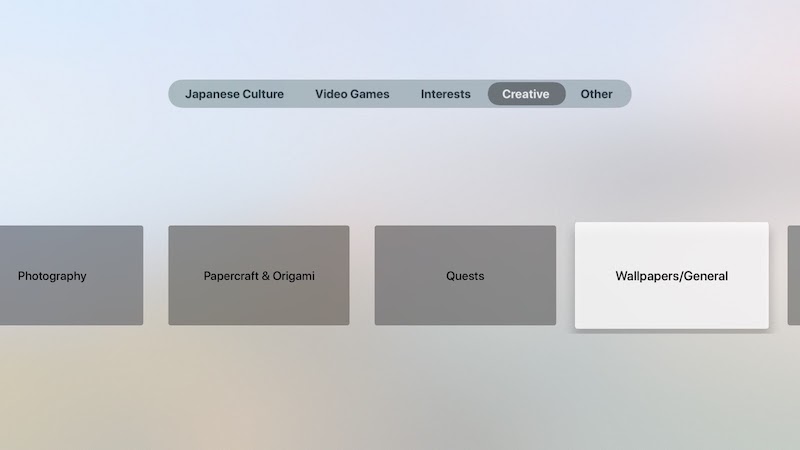
SwiftUI and Combine are available on many Apple platforms. So far I’ve gotten my imageboard browser working well on iPhone and iPad, and this weekend I got it working on Apple TV.
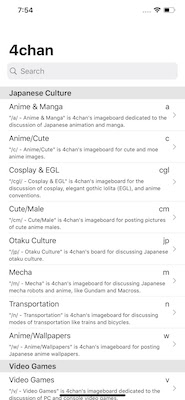
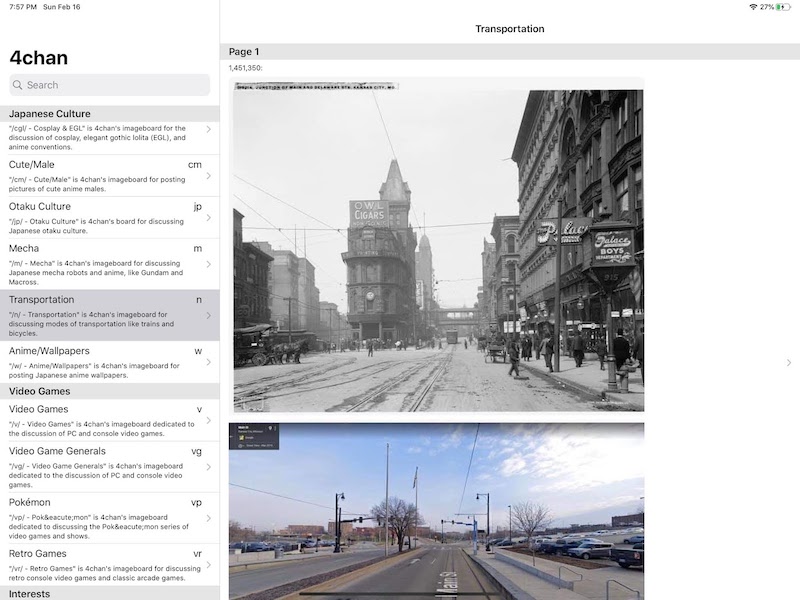
The iPhone and iPad run the same “Universal” app, which provides a vertical scrolling list and navigation stack UI
that works well for both iPhone:
and iPad:
The AppleTV app looks and acts quite differently:
More …
20 Jan 2020
I ported a toy path tracer to
Swift.
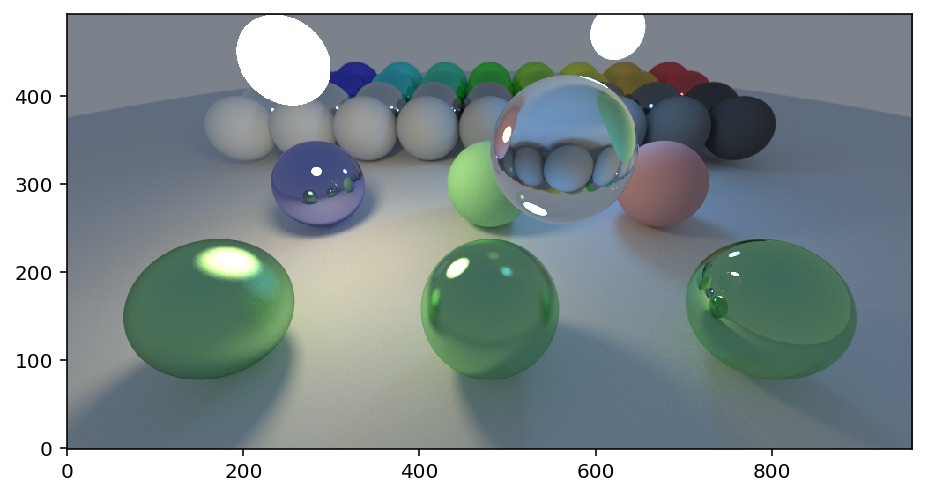
Some performance numbers:
| Environment |
Mrays/s |
| Colab, effectively single threaded |
3 |
| iPhone 11 Pro Max |
18 |
| iPad Pro 12.9” 2018 |
21 |
| iMac Pro 2017 18-core |
96 |
More …
04 Sep 2019
Some time around 1982, I saw an amazing comic on the wall of a Xerox
Alto computer room at the MIT AI
Lab.
Given the subject matter, I assume the comic was originally created at Xerox
PARC, possibly as part of the
NoteTaker project, but can’t
find any trace of it on the web. I have recreated it from memory, below.
The comic is explaining the events that happen when a
Dynabook is accidentally dropped off
the top of Half Dome in Yosemite
National Park. Note
that a free-fall calculator
claims that it would take over 12 seconds for the Dynabook to hit the Yosemite
Valley floor.

T+00.000 Dynabook accidentally dropped from top of Half Dome.
T+00.016 Dynabook notices that:
- It can’t sense its user.
- It is in zero gravity.
- There is a 200 MPH wind from below.
Dynabook concludes that it is falling:
- Turns off the display to save memory.
- Opens a radio connection to El Capitan radio tower.
- Begins backing up the user’s recent changes.
T+05.000 Dynabook hits a glancing blow to the side of Half Dome, breaking 3 of its 6 CPUs. The Dynabook reconfigures itself to continue working with the 3 remaining CPUs.
T+10.000 User data backup finishes.
T+11.000 Dynabook orders the user a replacement Dynabook.
T+12.000 Dynabook turns on an emergency locator beacon.
T+12.816 Dynabook smashes into the rocks at the bottom of Half Dome.
Forty Years Later: From Science Fiction to Science Fact
When I first read this comic, probably a few years after it was created, it
was total Science Fiction:
- Laptops weighed 25 pounds, contained miniature CRT monitors, and had to be plugged in to operate.
- Personal computers had single cores and no environmental sensors.
- Mobile phones weighted multiple pounds and didn’t have cellular modems. Yosemite Valley didn’t have cell service.
- Simply connecting to the Internet (then called the ARPANET) took over 30 seconds.
- Data flowed at a blistering 1440 bytes per second.
- Nobody in their right mind would take a fragile laptop to the top of Half Dome.
- Commercial use of the Internet was prohibited. While hobbyists bought and sold stuff, large companies, even computer makers, were not set up to allow products to be ordered over the Internet.
Over the years, each time I remembered this comic, I realized that it was
becoming more and more science fact. By now, 40 years later, almost all of the
events mentioned in this comic could actually happen as described.
To my mind the only unlikely events are:
- In 1979 frame buffers were a significant fraction (more than 75%) of a computer’s RAM, so it made sense to turn off the display to save memory. Today we would still turn off the display, but we would do it to save power.
- In 1979 Moore’s Law hadn’t been in effect as long. A multi-core CPU had to be made out of separate CPU chips, such that one or more cores could plausibly be damaged without destroying all the chips. Today we do use multiple cores (indeed, typically 6-8), but they are all on one giant chip.
The only remaining Science Fiction idea is the rescue beacon.
But Apple is rumored to be implementing that this year.
15 Jul 2019
I’ve been trying to decide which Apple laptop to buy for hobby programming.
I’m leaning towards the cheapest laptop Apple sells, the 2019 MacBook Air. As
far as I can tell, is fine for my current needs.
I specced out a more powerful and future-proof laptop, a 2019 MacBook Pro with
2x the RAM and SSD storage, but it was 60% more expensive.
I think it makes more sense for me to buy the cheaper laptop today, and plan
on replacing it sooner. Especially because I have a lot of family members who
would be fine with the cheaper laptop as a hand-me-down.
It does feel a little weird to decide that I don’t need a “Pro” machine. When
it comes down to it, Xcode, a SSD and a retina display are all the “Pro” I
need for hobby programming, and Apple has made those features available in the
budget Air line.
Follow-up
In the end I bought the more expensive Macbook Pro. I am a sucker. :-)
13 May 2019
Writing these notes in case they help someone.
My daughter recently tried to add her Apple ID to her iPhone’sApple Messages
app. (Settings > Messages > Send & Receive > Add Apple ID)
When she tried this, she got a dialog box where she could type in her Apple ID
and password. After a 15 second delay she got an error dialog box:
iMessage Activation
  An error occurred during activation.
        Try again
She got a similar error message if she tried to activate FaceTime:
FaceTime Activation
  An error occurred during activation.
        Try again
I searched the Internet, and tried the various remedies that Apple and others
suggested:
- Reboot Phone.
- Make sure the phone can receive SMS messages.
- Enable/disable iMessage and FaceTime.
- Log the iPhone out of iCloud and log back in again.
- Visit icloud.com and check the iCloud account to see if there’s any warnings or errors.
- Update the phone OS to the latest release version of iOS.
- Try to register with WiFi enabled but Cell disabled.
- Wait 24 hours and try again.
Having exhausted the home remedies, I contacted Apple Support by phone. Apple
Support listened sympathetically, and ran me through the same steps, it
roughly the same order. They also did a little bit of checking on their own of
the Apple ID account to see if there were any issues.
They couldn’t find anything wrong, and they suggested that I contact my
carrier.
I contacted my carrier, T-Mobile, and they ran me through the same steps as
Apple. They also had me check out my phone’s ability to connect to the
Internet for Data and SMS. They had me turn off my phone for a minute, so they
could update my phone’s SIM. Unfortunately, nothing they tried helped.
In the end, what worked was to admit defeat. I had my daughter create a new
Apple ID. She was able to use the new Apple ID to log into iMessage without
any problem.
So far the drawback of this solution seem to be:
- My daughter lost everything she had stored in iCloud.
- For many people this would be a serious issue.
- Luckily my daughter does not use iCloud at all.
- She uses Google services, like gmail, Google Docs and Google Photos, that do not depend on iCloud.
- My daughter has to re-add all her Contacts to her new Apple ID.
- My daughter lost some game progress in some of her Game Center aware video games.
My guess is that the problem was on Apple’s end. The symptoms and cure seem to
indicate that my daughter’s old Apple ID account was messed up in some small
way, and Apple’s diagnostic systems were not detailed enough to detect or
correct the issue.
So, anyway, I wrote this up to offer one more home remedy for people suffering
from the “An error occurred during activation” message when trying to log in
to iMessage. That message could have one of a number of different causes. If
you are seeing it, please try the simpler remedies first, and please contact
Apple Support (and your phone carrier’s support) for help. But if everything
else fails, be aware that for some users such as my daughter, one solution was
to switch to a new Apple ID.
22 Nov 2018
After weeks of research and thought, I bought a iPad Pro 12.9” 3rd Generation.
My impressions, based on a week’s use:
- It’s too expensive, especially once you include the pencil and keyboard case.
- It’s a significant improvement over the 1st generation iPad Pro 12.9”.
- It’s physically much smaller.
- The new keyboard is nicer.
- The new pencil’s magnetic charger makes it much more useful than before, because now it’s always charged when I want to use it.
- Flaws
- The magnets holding the pencil to the iPad are too weak. It’s easy to knock the pencil off the edge of the iPad when picking it up or carrying it.
- When the keyboard case is folded back, your hands touch the keys. This feels weird at first.
- The hardware is held back by iOS 12 and Apple App Store limitations.
FWIW I think for most people the ordinary 2018 iPad, with a Logitech Crayon,
would be a better purchase.
But I do enjoy using it!
22 Nov 2018
Botanicula is a whimsical
graphical adventure game for the iPad and other computers. One of the puzzles
near the end of the game requires a bit of thinking to solve. When I came upon
it, after a couple of hours of play, I was too tired to think. So I wrote some
code to brute-force the solution. I’m unreasonably pleased that it worked the
first time. Here’s the code, cleaned up and commented:
// Solve the anemone Botanicula puzzle.
// Number the anenome 1 to 7, left-to-right.
// Encode a list of anemones into a single integer, where bit 0 is anemone 1, etc.
func encode(_ d:[Int])->Int {
	return d.reduce(0, {x, y in x | (1 << (y-1)) })
}

// A list of which anemones are pulled down when a given anemone is tapped.
let moves = [
	encode([5,7]), // Tap anemone 1
	encode([3,6]),
	encode([2,4]),
	encode([3,5]),
	encode([4,1]),
	encode([2]),
	encode([1]), // Tap anemone 7
]

// Calculate the effect of tapping a given anemone |m|.
func move(state: Int, tap m: Int)->Int {
	return (state | // original state
		encode([m])) & // raise the item that was tapped
		~moves[m-1] // lower the items that need to be lowered
}

// Brute force solver. Try all moves to depth |depth|.
func solve(state: Int, goal: Int, depth:Int) -> [Int]? {
	if state == goal {
		return [] // We've reached our goal, don't have to make any moves.
	}
	if depth <= 0 {
		return nil // Ran out of depth, give up.
	}
	for m in 1...7 {
		let newState = move(state:state, tap:m)
		if let soln = solve(state:newState, goal:goal, depth:depth-1) {
			// If we could solve the newState, prepend our move to that solution.
			return [m] + soln
		}
	}
	// Couldn't find a solution.
	return nil
}

// Produce the shortest solution, if one exists.
func tryToSolve(state:Int, goal:Int, depth:Int)-> [Int]? {
	// Do a breadth first search by searching successively deeper.
	for d in 0...depth {
		if let soln = solve(state:state, goal:goal, depth:d) {
			return soln
		}
	}
	return nil
}

let start = encode([1,6]) // This will vary depending upon the state of the puzzle.
let goal = encode([7]) // This is the desired state (just anenome 7 raised.)
let solution = tryToSolve(state:start, goal:goal, depth:12)

print(solution ?? "no solution found")
07 Nov 2018
The Computer History Museum Oral Histories are a
wonderful project. They are deep, long, interviews with many different
programmers. Lots of never-before-made-public details about important
projects.
For example, this oral history by Oral History of Kenneth Kocienda and Richard
Williamson goes into details of how iOS was designed:

Or if you prefer PDFs:
Oral History Part 1
Oral History Part 2
One of the interesting things I found out was that there was an attempt to use
HTML/Web APIs to write iPhone apps, and that for the first two or three iOS
releases some of the apps, including the Stocks and Weather apps were
implemented as HTML/Web apps.
07 Nov 2018
I’m thinking of buying a new personal computer. I’m writing this essay to
crystalize my thoughts on what to buy.
Why I don’t currently have a personal computer:
I must have bought twenty personal computers over the years, starting from an
Exidy Sorcerer in 1978 and
ending with a 13” Macbook Pro in 2013.
But since 2014 I’ve been without a personal computer of my own. The Macbook
Pro’s been taken over by my son. I’ve got accounts on all my family’s
computers, but when they’re all in use I’m reduced to using my work laptop.
My company has a “don’t use company resources for personal projects” policy.
Since 2014 I’ve complied with this mostly by being too busy/lazy/distracted to
do any personal projects. :-) But now that I’m helping my kids with their
programming projects, it’s time to once again consider a personal computer.
Why not an iPad Pro?
I bought the original 12.9” iPad Pro and tried using it as a personal
computer. It didn’t work out, because I like to program apps, and the iPad Pro
doesn’t let you do much programming. And even if it did, the iPad Pro keyboard
is not very good for typing.
The 2018 model iPad Pros have great hardware, including an improved keyboard,
but they still don’t allow programming apps.
What’s my budget?
To put things in perspective, my first PC cost over $3,500 in current dollars,
my first Mac was $7,000 in current dollars and my most expensive personal
computer ever was a Macintosh IIfx at $20,000 in current dollars. I didn’t
actually pay $20,000. I was an Apple employee at the time, and they had a
“Loan to Own” program with extremely generous employee discounts. My most
recent personal computer cost $1,650 in current dollars.
So, all things being equal, I’d say my budget is in the $500-$2,500 range.
Perhaps more if there’s a really big benefit.
What do I want to do with it?
- iOS programming
- Unix programming
- Web surfing
- Content creation
I don’t need a high end GPU. I’m not planning on using it for PC gaming or
local machine learning.
Laptop or Desktop?
Over the past few years I’ve been living the laptop lifestyle at both work and
home. I like being able to take my laptop on trips. Recently it’s been useful
to take my laptop around the house to my different kids as I help them with
their programming projects.
So for me I think the laptop portability outweighs the bigger screen and
better price/performance of a desktop.
One use case: iPhone development. This typically requires the ability to
charge, and debug a USB-attached device at the same time.
The case for an iMac Retina.
Recently I’ve been using an iMac Pro at work. I really enjoy:
- Speed of compilation.
- Beautiful 5G screen.
- Large number of ports.
- Clean industrial design.
That makes me think that maybe a iMac 5G might be a reasonable choice.
Hardware specs:
New or used?
I don’t mind used, but it needs to be new enough to run the current version of
Xcode.
Upcoming changes:
- New macbook and iPad Pro TBA October 30th.
- iMac 5G spec bump October/Nov?
- New mac mini “pro” some time this year.
- New mac pro some time 2019
Some possible configs
| Hardware |
Price $ |
| iMac 5K 32GB/512GB (includes third party RAM upgrade) |
2400 |
| Macbook Pro 15 32/512 |
3000 |
| Macbook Pro 13 16/512 |
2200 |
| Macbook Air 13 8/512 (not retina) 1400 |
|
| Hackintosh AMD 16/500 (reuse old monitor.) |
900 |
| Hackintosh laptop |
600-900 |
| Nothing, keep using current hardware. This is a good option during the school year. |
0 |
Conclusion
In the end I bought a 2019 Macbook Pro 13”. I sometimes regret the small screen, compared to an iMac, but I like the
price and porability.
31 Jul 2018
One of my daughters recently took the Girls Who Code iPhone App Development
course.
This was a two-week summer course, taught 9 am to 4 pm in a high school
computer science classroom. The first week the girls were taught the basics of
the Swift programming language and iPhone App development. The second week the
girls formed into 4-person teams and wrote their own iPhone apps.
The girls learned how to use modern software development tools like Stack
Overflow, GitHub, and Trello.
Much of the instruction during the first week was by way of working through
examples from a private Girls Who Code website.
What worked well:
- The girls learned the basics of iOS app development, especially the Interface Builder.
- The girls learned how to work in small teams, how to design apps, how to meet deadlines, etc.
- The girls were motivated by the assignment of writing an app to improve society/the world.
- The girls learned how to present their final project to a group.
What could have been better:
- From watching to the final presentations, it seems like all the teams had trouble merging their changes. Every team reported that they had “lost” files and changes.
- I think an hour spent explaining how to deal with git merges and conflicts, and more tutor hand-holding during merging would be helpful.
- The course instructors were not familiar with advanced iOS programming, and could not help teams that wanted to explore more advanced iOS techniques.
Overall I think this was a well run course, with good value for money. It
would be appropriate for a high school girl who was already comfortable
programming in Python or Java, and was looking to learn the basics of iOS
programming.